
<img height="1" width="1" style="display:none;" alt="" src="https://px.ads.linkedin.com/collect/?pid=678804&amp;fmt=gif">
Skip to content
urban-utility-17-light urban-utility-17-dark

By Role

Construction Management Software for Engineering Managers

Get from as-designed to as-built faster. Vitruvi connects your design data to field production, so what gets built is captured and handed over accurately.

Trusted by Industry Leaders

HOW IT WORKS FOR ENGINEERING MANAGERS
From Design to As-Built, Every Asset Stays Accurate

Engineering managers should not chase marked-up PDFs and spreadsheets. Design data flows to the field, and as-built data flows back to the same mapped asset.

icon_checkmark-1

Step 1

Bring In Design Data

Upload GIS or CAD files, reuse upload templates, sync from VETRO FiberMap, or connect through the REST API.

Icon for human union

Step 2

Send Work to the Field

Crews see assigned work with its design elements and data requirements, so changes are visible in the field.

Icon for diamond

Step 3

Capture As-Built Data

Crews report quantities and photos and place geometry markups on the map. Required fields are enforced before submission.

icon-colum-3

Step 4

Review and Hand Over

Reports are reviewed before as-built data is accepted, and the original design geometry is preserved for comparison.

What Engineering Managers Get From Vitruvi

Connect Directly to Your Designs

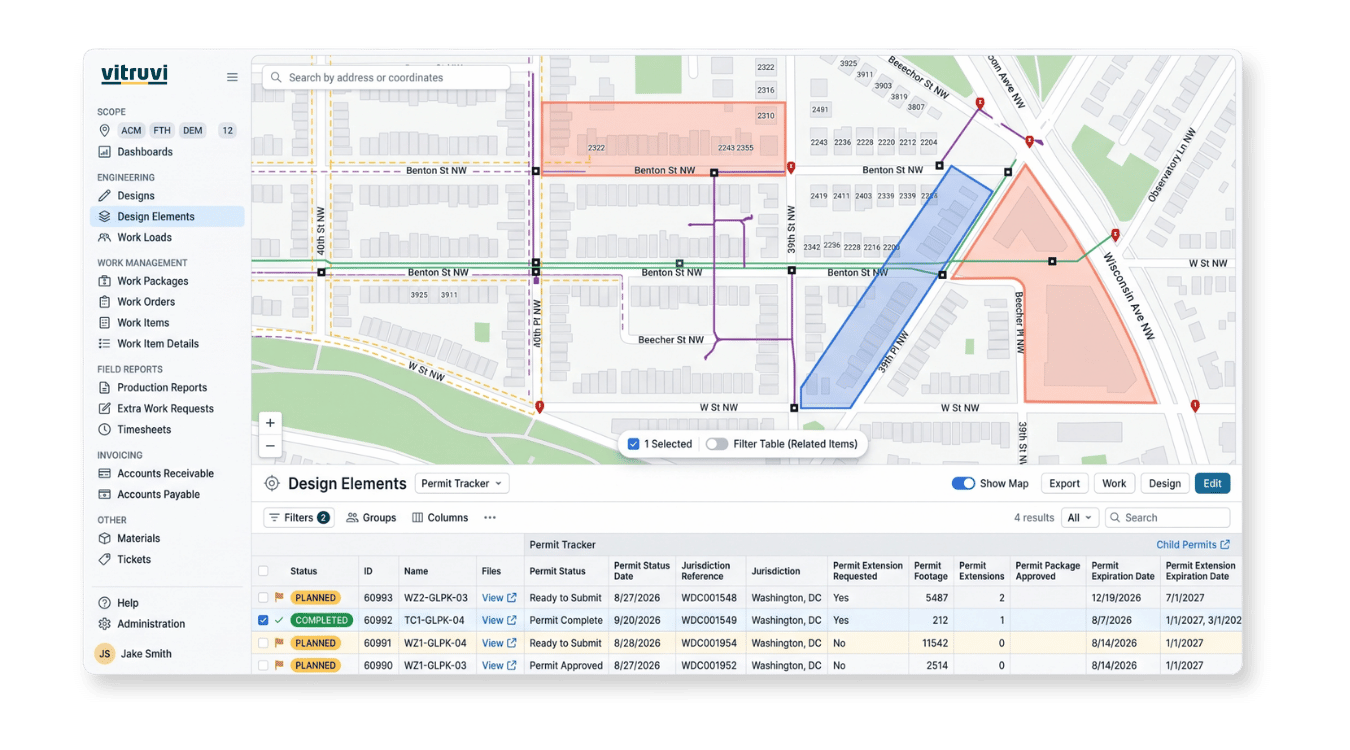
Vitruvi preconstruction view with design work organized by project and work package

Connect Directly to Your Designs

Keep design and as-built data in one place. Every design element is a mapped asset with its own work, field reports, and as-built record, so you are not reconciling marked-up PDFs and spreadsheets.

  • File uploads: GIS and CAD formats mapped to design element types

  • Upload templates: reused so mapping stays consistent

  • VETRO FiberMap: sync design data from the system you already use

  • REST API: link your design platform or system of record

Never Miss As-Built Changes and Requirements

Vitruvi mobile app on a tablet at a construction site

Never Miss As-Built Changes and Requirements

Put changes and requirements in front of the crew. Design changes and as-built data requirements travel with assigned work, so the team knows what to capture and what has changed.

  • Assigned work: shown with its design elements and data requirements

  • Geometry markups: placed on the map from the mobile app

  • Quantities and photos: reported against the right asset

  • Required fields: enforced before a report can be submitted

Faster As-Built Reporting With the Right Controls
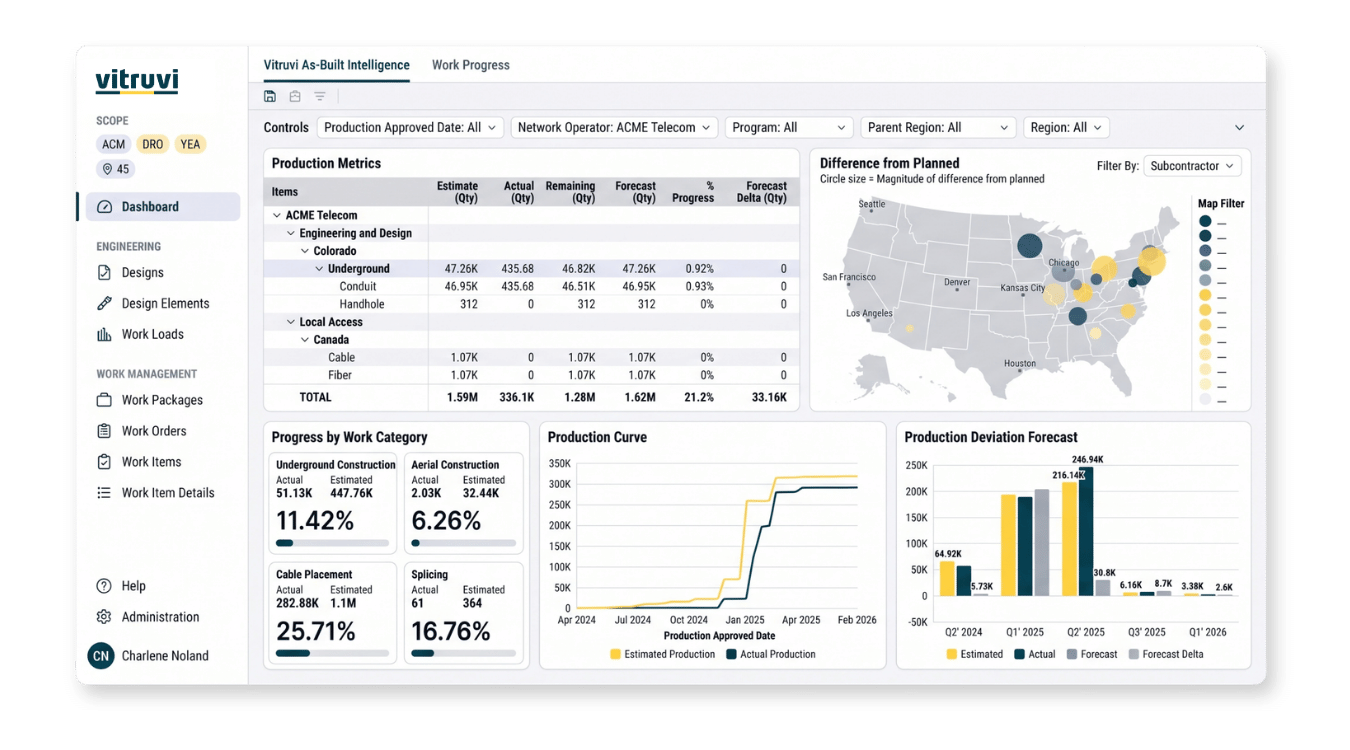
Vitruvi as-built dashboard showing project status and completion

Faster As-Built Reporting With the Right Controls

Keep as-built data accurate and defensible. Access controls, review steps, and a preserved design record make reporting faster without losing control.

  • Access control: by role, project, program, and module

  • Review and approval: as-built data is accepted only after review

  • Design history: original geometry preserved for comparison

  • Estimated vs. actual: compare quantities and share progress dashboards

Project Delivery Works Best When Everyone Shares the Same Data

Financial Managers

Pay and bill from approved field quantities, and see budget and cost as production comes in.

For Financial Managers

Project Managers

Plan and assign work, approve production from the field, and see progress without waiting on a status call.

For Project Managers

Field Technicians

Give crews the work, the map, and the details they need to report accurately from the job site.

For Field Technicians

“Ultimately, we use Vitruvi for end-to-end service delivery, from when a project is identified right to the construction completion. Vitruvi Construction Management has transformed our ability to scale.”

FAQs for Engineering Managers in Construction

What is construction management software for engineering managers?

It connects design data to field execution, so engineers can see what was designed, what was built, and what changed. Vitruvi is GIS-native, so every design element is a mapped asset with its own work and as-built record.

How do I get design data into Vitruvi?

Upload GIS or CAD files and map layers to design element types, reuse design upload templates, sync from systems such as VETRO FiberMap, or connect your design platform through the REST API.

How are as-built changes captured?

Field crews place geometry markups on the map in the mobile app and report quantities, photos, and required fields. Reports are reviewed before as-built data is accepted, and the original design geometry is preserved for comparison.

How do design changes reach the field?

Crews see their assigned work with the associated design elements and data requirements on mobile, so changes are visible in the field without separate emails or marked-up drawings.

Can I forecast materials from the design?

Yes. Quantities roll up from design elements into a forecast bill of materials, which you can compare to actual consumption as work is reported.

Can I control who can view or change engineering data?

Yes. Access is controlled by role, project, program, and module, so only authorized users can view or change data.

What kind of support and training does Vitruvi provide?

Vitruvi offers onboarding, learning on demand, tailored training, and responsive support so your team is confident from day one. Schedule a demo to see how it fits your projects.

Get from as-designed to as-built faster